I Was a Fool Not to Cache My Prompts
Updated June 25, 2026
Published June 25, 2026
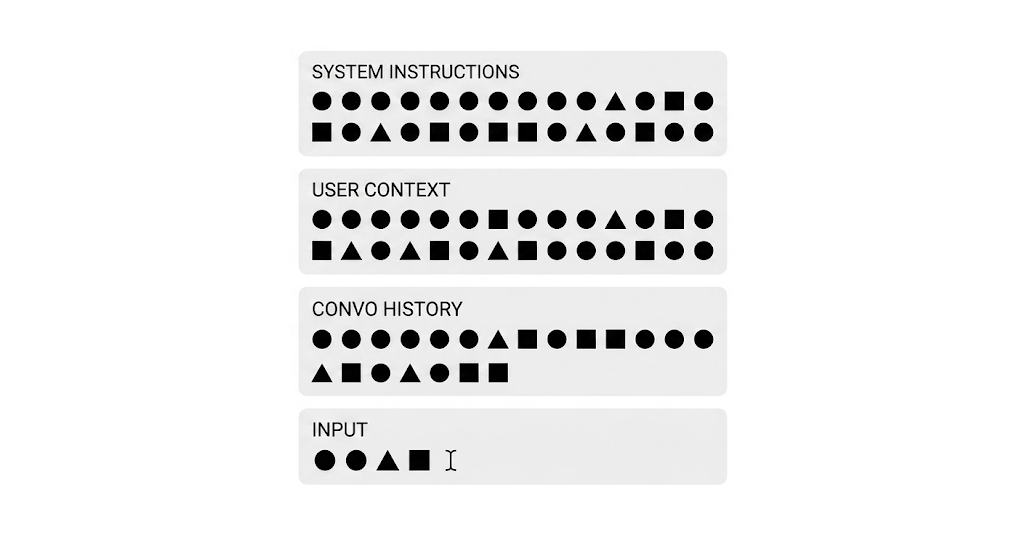
When you build an application on top of an LLM, you end up sending the same block of prompt over and over again to the model. Every request carries that same chunk of text, and every request runs it back through GPU computation to turn those tokens into the model's internal state before it can generate a single new word.
In a regular application, a system architect would never tolerate that. You cache the expensive things: a heavy calculation, a rendered page, a database read. You do the work once and reuse the result. LLM applications turn out to be no different. The expensive, repeated work here is re-processing the front of your prompt, and prompt caching is what lets you skip it.
Google was actually first to ship this, context caching landed on the Gemini
API back in 2024. I never got around to looking at it closely until recently,
even though I had been building agentic applications for years by then. This
post is partly me catching up, and partly the story of the mistakes I made
before any of this existed.
My first mistake
Before caching was a feature on APIs, I built a conversational chatbot that was meant to feel personal: it greeted you by name and matched whatever chatting style you picked, funny, friendly, or strictly professional. To make the model adopt that style, my prompt looked roughly like this.
See what could go wrong here?
If the same user keeps chatting, nothing goes wrong, those variables stay
fixed for the rest of the session, so the prompt is stable and would cache
cleanly. But the moment a different user shows up, the values change. The
{name} and {chat_style} are sitting right at the top, so a user who picked
"funny" can never hit the cached prefix built for a user who picked
"professional". Every new combination starts cold and pays to build a brand
new cache from scratch.
That was my first mistake, putting interchangeable variables early in the system instructions, ahead of the long static block that every user shares.
Caching only ever helps the prefix of a prompt: everything up to the first byte that changes. Put one volatile variable near the top and you poison everything after it, no matter how long and how identical the rest of the instructions are.
It got worse. There was a requirement that the chatbot always know the current date and time, so it could reason about how recent the retrieved context was. So I did the obvious thing.
Now the very first line changes on every single request, down to the microsecond. The prefix is different every time, so the cache could never hit even for the same user mid-conversation. That was the worst-designed prompt I have ever written.
I came across Agno's datetime instructions
feature, which
lets an agent automatically know the current date and time. I went and read
the implementation expecting it to be handled more carefully, but it
injects the timestamp straight into the system instructions, exactly where
mine was. Convenient to use, but it invalidates the cache on every single
call for the exact same reason.
The fix: order by how dynamic the content is
Once caching became widely available, I went back and applied a single idea to the agentic chatbot I was building: restructure and reorder the message object sent to the model according to how dynamic each piece of content is. Stable things go first, volatile things go last.
It settles into five layers, in this order.
1. Static system instructions
The master instructions. This can be a long block of text, but the point is
that it does not change over time and is shared by every user and every
session. Anthropic actually publishes the system prompts for Claude with each
release if you want to see how big and how stable these get, the
Claude system prompts release notes
are a good reference.
Because it is both large and unchanging, this block is the single best caching candidate you have. It should sit at the very front so that as much of the prefix as possible is reused on every call.
2. User context
Similar to the static instructions, but semi-dynamic. It can change on the fly per use settings (but not very often and almost never mid-conversation). Think role-based instructions, subscription-tier rules, user preferences, and long-term memory.
Where does this block actually come from? In the apps I build, it is assembled once at the start of a session. The user signs in through an OAuth frontend, which is the point where the user is actually identified, and that hands a user ID to the backend. From there the backend is the hub. It checks Redis first, and on a cache miss it falls back to the database for the user's tier, permissions, and memory, writes the assembled context back into Redis, then injects the result into the prompt for the LLM. Those are independent calls the backend makes, not a chain that passes through one service to reach the next.
A lot of what goes in here is conditional on who the user is. Their plan decides which tools they get, and their role decides what those tools are allowed to do. Rather than branch inside the static instructions, I assemble those differences into this one block, wrapping each part in its own tag so the model can tell them apart:
Read the red lines as the restricted case and the highlighted lines as the elevated one. A free user gets nothing extra while a pro user gets the image tool, and a plain user is locked to read-only SQL while an admin can run anything. Same position in the prompt, different text depending on the person.
Keeping this in its own block, after the static instructions and before the conversation, means it rides the cache for an entire session. When it does change, say the user upgrades their tier, only this block and everything after it is invalidated, the big static instructions block in front of it stays warm. And because Redis already holds the assembled context, rebuilding that block is cheap even when it does change.
3. Conversation history
For a turn-style chatbot, this is the running transcript: assistant messages, human messages, and tool-call messages all interleaved. It grows by a couple of entries every turn, but crucially it only ever appends, the earlier turns stay byte-for-byte identical, so the whole history up to the latest turn keeps hitting the cache.
A long enough conversation, or an agent that reads large files and tool
outputs into its history, eventually runs into the opposite problem: the
transcript itself gets expensive to hold in context, cached or not, because
every cached token is still billed, just at a steep discount, and it still
counts against the context window. A few frameworks ship a helper for
trimming it back down:
pruneMessages in the AI SDK,
trim_messages in LangChain,
and LangChain's
SummarizationMiddleware,
which collapses older turns into a summary once the history crosses a token
threshold.
These helpers are trading one cost for another. The moment you prune, trim, or summarize anything in the middle of the transcript, every byte after that edit point stops matching the cached prefix from the previous turn. You save on context size and on the tokens you would have resent, but you pay for a full cache miss on the next request. Worth it for a transcript that has grown huge, not something to run on every turn.
A concrete version of this shows up with agentic coding tools. Say the agent reads a skill file with the bash tool early in the session:
{
  "command": "cat SKILL.md"
}# Skill: deploy-service ## Overview This skill walks through deploying a service to the internal cluster, covering health checks, rollback... [ ~4,200 more tokens of instructions ]
By turn 30, that one tool result is still sitting untouched in history, unread again, just taking up space. An app that prunes aggressively might replace it in place to shrink the context:
{
  "command": "cat SKILL.md"
}# Skill: deploy-service ## Overview This skill walks through deploying a service to the internal cluster, covering health checks, rollback... [ ~4,200 more tokens of instructions ]
That swap shrinks the context by a few thousand tokens, but it also rewrites a message that sat well inside the previously cached prefix. Every turn from that point on starts cold and rebuilds the cache from scratch, at least once, before it can start accumulating hits again. Whether that trade is worth it depends on how large the saved block is versus how many turns are left to amortize one cache rebuild over.
4. Optional system reminder
This is the layer most people forget to isolate. It is not a tool the model calls, it is middleware on your side: a small step that inspects the incoming user input and, when some condition is met, injects a reminder right above that input before the request goes out. Some providers do this for you, for example when the turn carries a file attachment they slot in a note telling the model to be extra careful that the attachment might be malicious. The same mechanism is used to warn the model when the input trips sensitive keywords around harm, sexual content, violence, or self-harm. And it is exactly where a genuinely dynamic value like the current date and time belongs, instead of up in the static instructions where it poisons everything.
So the assembled tail of the request looks like this, the reminder sitting between the cached history and the user's actual message:
Because it is conditional and dynamic, it has to live here, after the cached history and right before the new input. Put it anywhere earlier and it would bust the cache for the entire conversation. Put it here and it costs you one small uncached block.
This is also where that datetime.now() from my first mistake should have
lived all along. The current date and time is about as dynamic as content
gets, it changes on every call, so it belongs in this last, deliberately
uncached layer, not stapled to the front of the static instructions:
And reminders are not limited to one per request, this layer can stack as
many as apply to the current turn. An attachment plus a timestamp plus a
sensitive-keyword flag all show up as separate <system-reminder> blocks,
one after another, right before the user's input:
Each reminder only costs you its own small slice of uncached tokens, the cached history in front of all of them stays untouched no matter how many stack up.
5. User input
The actual message from the frontend. New every call, never cacheable, and that is fine, it is supposed to be the one part that always changes. It goes dead last so that everything in front of it is a stable, reusable prefix.
It is rarely just text, either. When the user attaches a file, it rides along in this same message. On OpenAI's Responses API the input message carries the text and the file as parallel content parts (this is the shape that triggers the attachment reminder from the previous step):
Watch what that does turn over turn. The stable prefix keeps growing as history appends, so the cached slice of each request climbs while the part you pay full price for stays tiny. Mock numbers, but the shape is what every well-ordered context window looks like:
How Claude, OpenAI, and Gemini implement it
The ordering above is the part you own, and it pays off no matter who you call.
What differs between providers is two things: how the cache prefix is keyed and
billed, and whether they will hold the conversation history for you so you can
stop resending it. Each has its own docs worth reading directly,
Claude's prompt caching guide
and
OpenAI's prompt caching guide
cover the mechanics on their respective platforms. The economics rhyme
everywhere, a cache read is far cheaper than reprocessing the same tokens from
scratch:
The big split is control. Claude makes you mark the cache breakpoints yourself
with cache_control, OpenAI does it automatically off the prompt prefix with
nothing to configure, and Gemini does both, implicit by default and an explicit
named cache object when you want to manage the lifetime. They have also all
grown a way to keep the transcript server-side, so the append-only history
stops being something you rebuild by hand: OpenAI's
stored responses
(
previous_response_id), Gemini's
Interactions API
(
previous_interaction_id), and on Claude's side memory and chat search that
live in the apps rather than the
Messages API.
client.messages.create(
  model="claude-opus-4-8",
  system=[
      {"type": "text", "text": INSTRUCTIONS,
       "cache_control": {"type": "ephemeral"}},
      {"type": "text", "text": user_context,
       "cache_control": {"type": "ephemeral"}},
  ],
  messages=history + [user_turn],
)
The knobs differ, but the move is the same on all three. Keep the stable prefix identical across turns and let the cache do the rest.
The takeaway
The pricing tables and the API surfaces are different, but they all reward the same thing. Looking back at my early prompt, the bug was never the variables themselves, it was where I put them. The name, the chat style, the timestamp, all of it belonged lower in the stack, not stapled to the front of the instructions.
Sort your context blocks by how often they change, and lay them out in that order: static instructions, then user context, then conversation history, then any runtime reminders, then the user's input. The cache hit rate follows directly from that ordering, on every provider.
 puvish.dev, All Rights Reserved.